Adding IBInspectable to a UICollectionViewCell subclass
One very useful feature I find is to add a IBInspectable background image to my views. In an entertainment app I’m currently building there is a designable cell that looks like this:
@IBDesignableclass TrailerCollectionViewCell: MediaCollectionViewCell { @IBOutlet weak var lengthLabel: UILabel! @IBInspectable weak var bgImage: UIImage! { didSet { imgView.frame = self.bounds self.addSubview(imgView) imgView.image = bgImage imgView.contentMode = UIViewContentMode.Center self.sendSubviewToBack(imgView) } }}
what’s great about this is it gives me a very easy way to set a background image on my TrailerCollectionViewCell. It shows right up in my storyboards so I can easily set it to my “play” icon graphic.
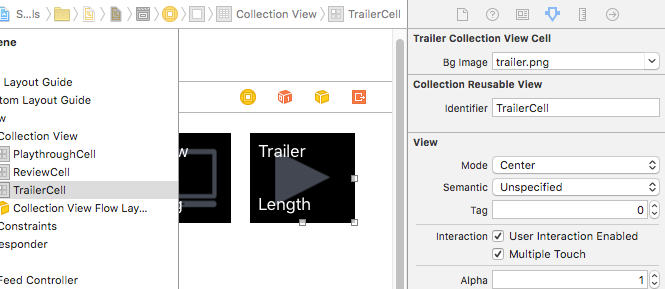
Notice on the top-right of the attributes inspector it adds a “Bg Image” dropdown. When this is changed the didSet method above is triggered and it updates the view inside of Xcode, and when the iOS app runs. This is happening because the decoding from interface builder will also trigger didSet in the same fashion that interface builder does.
What’s not so handy about this approach is that I have two other types of CollectionViewCell subclasses that need similar functionality. So, I have these three classes inherit from one superclass that implements the functionality.
import Foundationimport UIKit class MediaCollectionViewCell: UICollectionViewCell { @IBOutlet weak var titleLabel: UILabel! var imgView = UIImageView() @IBInspectable weak var bgImage: UIImage! { didSet { imgView.frame = self.bounds self.addSubview(imgView) imgView.image = bgImage imgView.contentMode = UIViewContentMode.Center self.sendSubviewToBack(imgView) } }} class TrailerCollectionViewCell: MediaCollectionViewCell { @IBOutlet weak var lengthLabel: UILabel!} class ReviewCollectionViewCell: MediaCollectionViewCell { @IBOutlet weak var ratingLabel: UILabel!} class PlaythroughCollectionViewCell: MediaCollectionViewCell { @IBOutlet weak var lengthLabel: UILabel! @IBOutlet weak var ratingLabel: UILabel!}
It doesn’t work!
Here’s the problem though: The field disappears in my storyboard!
I spent some time debugging this issue, and found that I could work around it by overriding the bgImage variable in my subclasses, but it was not neccessary to re-implement anything. Success!
The fix
Just adding this line did the trick:
@IBInspectable override var bgImage: UIImage! { didSet {} }
So now my complete file looks like this:
import Foundationimport UIKit class MediaCollectionViewCell: UICollectionViewCell { @IBOutlet weak var titleLabel: UILabel! var imgView = UIImageView() @IBInspectable weak var bgImage: UIImage! { didSet { imgView.frame = self.bounds self.addSubview(imgView) imgView.image = bgImage imgView.contentMode = UIViewContentMode.Center self.sendSubviewToBack(imgView) } }} class TrailerCollectionViewCell: MediaCollectionViewCell { @IBOutlet weak var lengthLabel: UILabel! @IBInspectable override var bgImage: UIImage! { didSet {} }} class ReviewCollectionViewCell: MediaCollectionViewCell { @IBOutlet weak var ratingLabel: UILabel! @IBInspectable override var bgImage: UIImage! { didSet {} }} class PlaythroughCollectionViewCell: MediaCollectionViewCell { @IBOutlet weak var lengthLabel: UILabel! @IBOutlet weak var ratingLabel: UILabel! @IBInspectable override var bgImage: UIImage! { didSet {} }}